Top 20 Essential Firefox Add-ons for Web Designers
Let’s look at our top 20 essential Firefox extensions geared for people who build websites.
1. Web Developer
The Web Developer add-on extends Mozilla Firefox by adding a toolbar with various options for working with web pages. For example, it has an option to inspect CSS styles of page elements that will tell you what CSS attributes they have, and which styles affect them.
2. SeoQuake
SeoQuake will help you in optimizing your web pages for search engines. It gives you an SeoBar that has loads of useful SEO-related options for you to take advantage of. This extension will assist you in identify issues pertaining to search engine indexing in your web pages.
3. Window Resizer 1.0
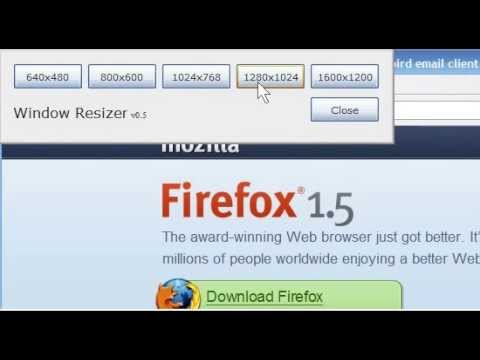
Window Resizer comes in handy for testing different screen sizes and monitor resolutions. It quickly and accurately resizes Firefox’s viewport so that you can test to see how your design looks in standard resolution sizes.
4. FireShot
FireShot is a Firefox add-on that creates screenshots of your web page. What is unique about this plugin is that it gives you a set of editing and annotation tools for working with your screenshots. This can be a handy extension to have for presenting your work in your portfolio.
5. Firebug
Firebug is considered to be the ultimate developer’s tool for Firefox. You are given a ton of web development tools to use from within your browser. You can explore, edit, debug, and monitor CSS, HTML, and JavaScript in real-time on any web page.
6. Greasemonkey
The Greasemonkey Firefox add-on enables you to modify how a web page looks and works by using small snippets of JavaScript. There are hundreds of scripts that you can download to enhance this add-on.
7. ColorZilla
ColorZilla is an incredibly simple extension for Firefox. If you’ve ever wanted to determine what colors are used on a web page, ColorZilla is the tool for the job. It adds an eyedropper icon to the bottom-left corner of Firefox.
8. FireFTP
FireFTP is a streamlined Firefox extension for uploading files to a server. It offers several advantages to standalone FTP applications, such as its operating system-independent requirements. This browser add-on has all the features you would expect from standalone apps.
9. IE Tab
This great add-on for web developers allows you to switch back and forth from IE and Firefox layout engines with a click of a button. This permits you to test and compare how each browser renders your web pages without having to leave Firefox or install IE(vil).
10. Palette Grabber
This add-on will build color themes that are exportable to popular graphic-editing software such as Photoshop, Paint Shop Pro, GIMP, Fireworks, and Paint.NET of the web page you’re currently viewing.
11. Font Finder 0.5c
With this add-on, you can highlight any text on a page to find out CSS styling information about that highlighted block of text.
12. Total Validator
This extension is an all-in-one validation tool that will check HTML, links, take screenshots and do a lot more. It also performs accessibility validation (WCAG, US-508), broken link checking, spell checking (in five different languages), and take screen captures via different web browsers and operating systems to see how your web pages look.
13. Platypus
Hands down, Platypus is one of the best Firefox extensions for modifying a web page. It works with Greasemonkey as a sort of WYSIWYG and it will remember your edits when you visit the web page again. You can use it to experiment with different variations of a web design.
14. Dummy Lipsum
An add-on with a very simple purpose, Dummy Lipsum generates Lorem Ipsum dummy text for you to use in your designs.
15. Page Diff
Page Diff is an add-on that helps web developers and designers see HTML source code differences between web pages. This is helpful for finding code irregularities or differences that will enable you to debug rendering issues.
16. Aardvark
Aardvark, aimed at front-end web developers, let’s you select web page elements and gives you several options for them, such as removing them from the web page (great for screen shots) or modifying their colors (helpful when printing web pages).
17. Codetch
Codetch is a WYSIWYG editor add-on that allows you to edit web pages directly in Firefox. The interface is modeled after Dreamweaver (but thankfully, the price is not).
18. Measure It
Measure It is an add-on that gives you a built-in ruler for measuring web page elements. It’s great for figuring out dimensions of things on a web page.
19. YSlow
YSlow is a web browser utility that benchmarks a web page’s front-end design performance. It will assist you in optimizing your web designs for fast response times by identifying performance issues.
20. CSSViewer
CSSViewer allows you to inspect CSS properties on a web page that you’re viewing. It’s a great way to study styles that you’ve seen on websites to learn CSS development techniques.
What Firefox Addons do you use?
Why do you use them? Join us in the comments!